

If your OnlyFans Twitter account keeps getting suspended, it's likely due to a few key reasons: spam-like behavior, platform manipulation, or improper handling of NSFW content. These suspensions often stem from automated systems flagging accounts for repetitive actions, improper proxy setups, or failing to follow Twitter's rules for adult content.
Key Takeaways:
- Spam Triggers: Reposting identical content, excessive hashtags, and mass following/unfollowing can flag your account.
- Multiple Accounts Misuse: Using multiple accounts to boost engagement or posting identical content violates Twitter's rules.
- NSFW Content: Not marking adult content as "sensitive" or sharing misleading links can lead to suspensions.
- Proxy Issues: Using cheap or shared proxies can make your activity appear suspicious to Twitter's systems.
- Warning Signs: Sudden drops in engagement, frequent verification prompts, or action blocks indicate your account is at risk.
Solutions:
- Post original content with meaningful captions and avoid repetitive actions.
- Use high-quality residential or mobile proxies to protect your accounts.
- Mark NSFW content properly in your settings and avoid deceptive links.
- Manage multiple accounts carefully, ensuring each serves a distinct purpose.
- If suspended, appeal through Twitter's Help Center and avoid creating new accounts immediately.
By following these strategies, you can reduce the risk of suspension and maintain a consistent presence for your OnlyFans promotions.
🚨 Is Your X or Twitter Account Suspended? How to Unsuspend an X or Twitter Account Officially & Fast
Why Twitter Suspends OnlyFans Accounts
Let’s dive into the specific actions that can lead to Twitter suspending OnlyFans accounts.
What Triggers Account Suspensions
Twitter’s automated systems tend to flag accounts for three main reasons: spam behaviors, platform manipulation, and improper handling of NSFW content.
Spam behaviors include actions like reposting the same content over and over, sharing links without adding any meaningful commentary, or overloading tweets with hashtags that don’t fit the context, all in an effort to drive traffic. Additionally, mass following or unfollowing other accounts and any activity that feels inauthentic or automated can also lead to penalties.
Platform manipulation occurs when creators run multiple accounts to interact with their own content, artificially boosting their reach. This can include cross-posting identical material across profiles or engaging in coordinated activity that appears deceptive. While Twitter allows users to manage up to 10 accounts for different purposes, using them in a way that feels orchestrated or misleading can result in immediate action. Another common issue is deceptive links, where the destination doesn’t match what was originally promised, which violates Twitter’s rules.
"You may not engage in inauthentic activity that undermines the integrity of X."
– X Rules and Policies
When it comes to NSFW content, the problem isn’t the adult material itself - Twitter allows it - but failing to properly label it. Creators are required to mark all NSFW content as "sensitive" in their account’s privacy settings. Without this designation, the account risks suspension. As Darko Petkov from Twesocial explains: "Twitter allows adult content as long as you follow the rules. This means marking any NSFW content as sensitive and making sure your content complies with Twitter's terms".
Why OnlyFans Creators Face Higher Risk
OnlyFans creators often find themselves under heavier scrutiny because their promotional strategies frequently overlap with behaviors Twitter flags as spam. For instance, repeatedly posting links to subscription pages or using link-in-bio tools like Linktree without adding unique commentary can be flagged as "Content Spam". Many creators also engage in "Shout for Shout" (S4S) deals, retweet groups, or engagement pods to boost their visibility - all of which Twitter classifies as "coordinated inauthentic activity".
Another common issue is the use of multiple accounts to promote similar content, such as pairing a teaser account with a main profile. This overlapping activity violates Twitter’s rules. On top of that, employing unauthorized automation tools to post or interact with content further increases the chances of suspension.
Warning Signs Before Suspension
There are several warning signs that your account might be at risk. One major indicator is a sudden drop in reach or engagement, which often means Twitter has started limiting your content’s visibility in search results or the "For You" timeline. If you frequently encounter prompts to verify your account with a phone number or face repeated ReCaptcha challenges, it’s a sign that Twitter suspects your account of automated activity.
Another red flag is receiving action blocks, where your account is placed in read-only mode for a period ranging from 12 hours to 7 days. During this time, you’re restricted from posting or engaging with others. Twitter might also temporarily hide your profile media or bio, requiring you to edit it to comply with their rules. If you receive DMCA copyright infringement notifications, take them seriously - Twitter operates under a "6 strikes" policy, and repeated violations can result in a permanent ban.
Recognizing these early signs can help you adjust your practices and avoid suspension, as we’ll discuss in the next sections.
Content and Policy Violations That Cause Suspensions
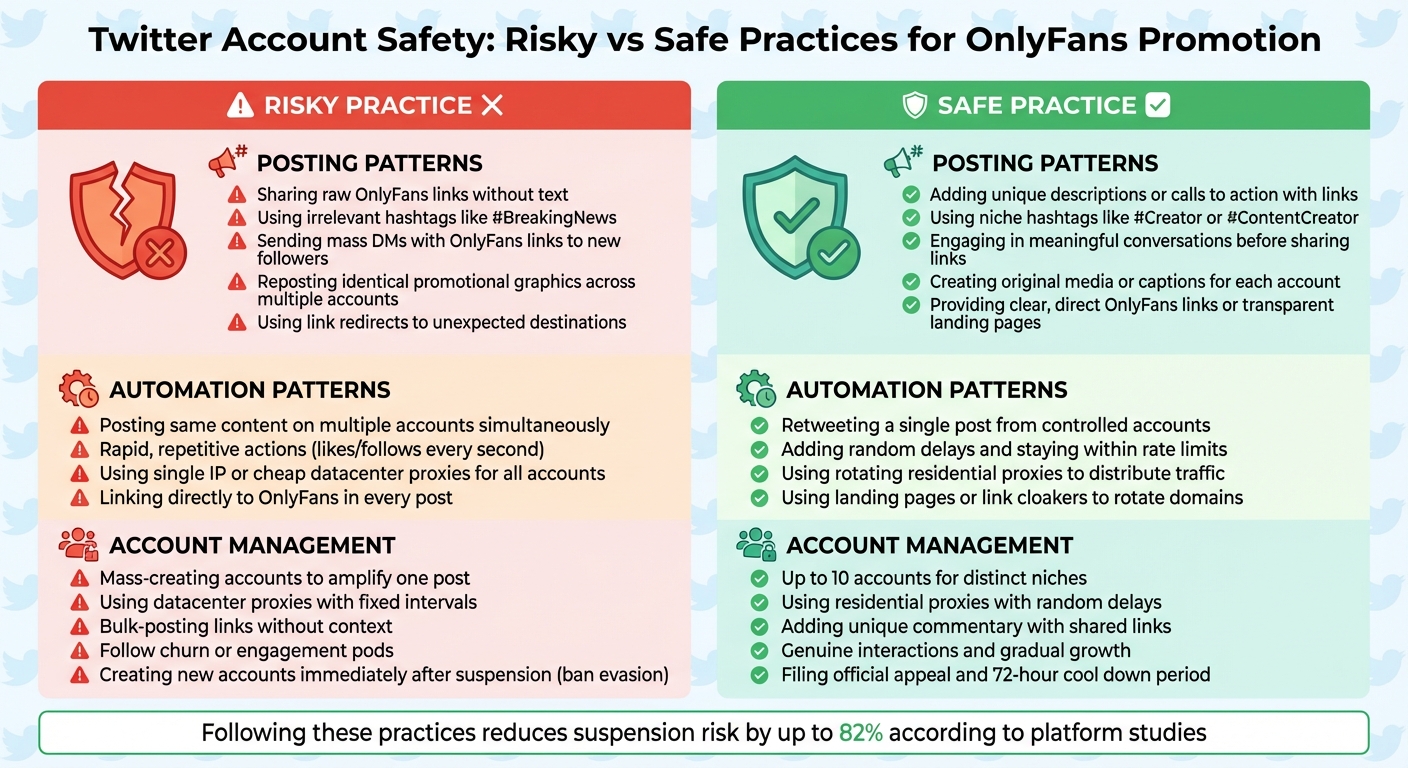
Twitter Account Safety Guide: Risky vs Safe Practices for OnlyFans Creators
Content Rules for OnlyFans Accounts
One common mistake is sharing OnlyFans links without providing any context. Twitter often flags such posts as spam. Similarly, using misleading links - like URL shorteners or altered URLs that don’t match the actual destination - can result in suspensions. Twitter also has strict rules against promoting "Adult and sexual products and services" through Paid Partnerships. In simple terms, you cannot accept payments, gifts, or commissions to advertise adult content in partnership posts.
Keep your profile professional and authentic. Avoid using explicit profile or header images, and steer clear of stolen or AI-generated photos designed to create a false persona.
These rules are essential for ensuring safer and more compliant engagement, as outlined below.
How to Post and Engage Safely
To properly flag explicit posts, enable sensitive media settings by navigating to Settings and Privacy > Privacy and Safety > Content You See on your account. When sharing links, always include unique commentary and use targeted hashtags like #Creator or #ContentCreator to help your posts reach the right audience.
Avoid spamming followers with unsolicited messages. Sending OnlyFans links via direct messages to new followers is considered spam and could result in your account being locked. Instead, focus on building genuine conversations. Also, steer clear of engagement pods - groups where creators coordinate likes, retweets, or follows - as this type of activity is seen as inauthentic and may lead to penalties.
| Risky Posting Pattern | Best Practice |
|---|---|
| Sharing a raw OnlyFans link without any text | Adding a unique description or call to action with your link |
| Using irrelevant hashtags like #BreakingNews to promote your profile | Sticking to niche hashtags like #Creator or #ContentCreator |
| Sending mass direct messages with OnlyFans links to new followers | Engaging in meaningful conversations before sharing links |
| Reposting identical promotional graphics across multiple accounts | Creating original media or captions for each account |
| Using link redirects that lead to unexpected destinations | Providing clear, direct OnlyFans links or transparent landing pages |
If you manage multiple Twitter accounts, ensure each one has a distinct purpose and doesn’t duplicate content. Twitter allows up to 10 accounts per user, but using them to post identical content or artificially boost engagement is a violation of their policies. Finally, keep your interactions respectful. Using aggressive or confrontational language in captions or replies can lead to harassment reports and potential penalties.
Managing Automation, Multiple Accounts, and Proxies
Building a solid online presence for OnlyFans promotion requires smart use of automation tools and careful proxy management.
Challenges with Automation and Multiple Accounts
Twitter has strict policies against automated, inauthentic behavior. For example, using tools to post identical content across multiple accounts at the same time can be flagged as "coordinated inauthentic activity." Similarly, actions like bulk liking or following large numbers of accounts in quick succession can trigger Twitter's detection systems. Tests have shown that accounts relying heavily on mass automation often face bans within 5–7 days.
Interacting with flagged profiles also increases the risk of being caught due to "guilt by association". This can result in shadowbans, where your tweets are hidden from search results or replies are buried behind a "Show more" option. Twitter also monitors patterns of activity - if multiple accounts post at the same time or use identical captions, they may be linked together. A study found that 82% of shadowbanned accounts had a high ratio of fake followers.
Safer Automation and Account Management Practices
To avoid detection, your accounts need to mimic genuine user behavior. Here are some strategies:
- Randomize your actions: Introduce delays between tasks, such as waiting 1.3 seconds for one action, 2 seconds for another, and 5 seconds for the next. This unpredictability makes your activity seem more natural.
- Separate account roles: Use a "Main Account" for professional, clean content and "Assistant Accounts" for more aggressive promotional activities like retweeting. This keeps your primary account safer, even if others get flagged.
"Twitter prohibits any attempt to use automation for the purposes of posting or disseminating spam, and such behavior may result in enforcement action."
– Yoel Roth, Former Head of Site Integrity, Twitter
Respect Twitter's rate limits. While users can manage up to 10 accounts, each must serve a distinct purpose and avoid duplicating content. Avoid repetitive updates that consist mainly of links, as these are easily flagged by the platform.
| Unsafe Automation Pattern | Safer Configuration |
|---|---|
| Posting the same content on multiple accounts simultaneously | Retweeting a single post from a few controlled accounts |
| Performing rapid, repetitive actions (e.g., likes or follows every second) | Adding random delays and staying within rate limits |
| Using a single IP or cheap datacenter proxies for all accounts | Employing rotating residential proxies to distribute traffic |
| Linking directly to OnlyFans in every post | Using landing pages or link cloakers to rotate domains |
Effective automation also depends on a reliable proxy setup, which plays a key role in avoiding detection.
Why Proxy Setup Matters for Account Safety
Your choice of proxy can significantly impact account security. Twitter focuses on banning accounts and tracking devices, but poor proxy choices can make your activity look suspicious. Datacenter proxies are particularly risky - they're easily identified as non-residential and are often flagged as bot traffic almost immediately. Additionally, frequent IP changes, especially if they involve jumps between countries or datacenter origins, raise red flags.
"If your IP address jumps around countries, shows datacenter origins, or behaves too 'machine-like,' you're gonna look super shady."
– NodeMaven
The solution lies in using residential or mobile proxies from real internet service providers. These proxies use IP addresses from actual households or mobile networks, making it nearly impossible for Twitter to distinguish your traffic from that of everyday users.
For primary accounts, static residential proxies are ideal. They maintain a consistent IP address, reducing the risk of being flagged for abnormal activity caused by constant IP switching.
BirdProxies offers a range of options tailored for managing multiple accounts. Their residential proxies use real household IPs with high trust scores, while their ISP proxies provide stable connections with fast response times and low chances of being blocked. Both options help you avoid the pitfalls of cheap datacenter proxies, and you can select geo-locations to align with your target audience.
sbb-itb-ea6392c
Using BirdProxies Safely for Twitter Promotion
Setting up a secure proxy is essential to maintaining account integrity and avoiding Twitter bans. It works hand-in-hand with best practices for managing content and automation.
Common Proxy Mistakes That Lead to Bans
A lot of OnlyFans creators stumble into trouble by making critical errors with their proxy setups. One big mistake is reusing the same IP address across multiple accounts. This can trigger Twitter’s detection systems - if one account gets flagged, all linked accounts are at risk of suspension. Another common misstep is relying on standard VPNs, which often use shared or previously flagged IPs, further increasing the chance of suspension.
To avoid issues, don’t reuse IPs across accounts or frequently switch IPs, especially between regions or datacenter origins. Cheap datacenter proxies are often flagged as non-residential traffic, immediately raising red flags.
Using a single IP for multiple accounts is another risky move. If one account gets flagged, it could lead to a chain suspension of all associated accounts. Twitter also uses browser fingerprinting through JavaScript to track devices, meaning even if you change your IP, a previously flagged device can still be detected.
"Twitter doesn't IP ban unless in the case of something serious like a cyber attack... [but] if you skip the deleting of the app and simply logout and make a new account, you'll be banned as soon as you make it."
– Shannon Redman
Now, let’s dive into how BirdProxies helps solve these common issues.
BirdProxies Features for Twitter Account Protection
BirdProxies offers specialized proxy solutions tailored to different account management needs. For main promotional accounts, ISP proxies are a great choice. They combine speed with high trust scores, ensuring stable performance without raising security concerns.
The residential proxy pool, with over 72 million rotating IPs in 180+ countries, allows you to match your account's claimed location and mimic real user behavior. These proxies are seen by Twitter as regular household traffic, reducing the risk of detection. For accounts needing maximum protection, mobile proxies use IPs from mobile networks, which are harder for platforms to detect or block.
BirdProxies also ensures clean, unused IPs to help you avoid 403 Forbidden errors and bypass strict anti-bot systems. Its instant refresh feature lets you quickly obtain new IPs if needed, whether one gets flagged or you’re preparing for a major campaign. Plus, with unlimited bandwidth and threads, you can handle high-traffic periods or bulk operations without interruptions.
| Proxy Type | Best Use Case | Key Advantage | Recommended For |
|---|---|---|---|
| ISP Proxies | Main "mother" accounts | Stable and trusted | Professional posting and consistent engagement |
| Residential Proxies | Account creation and location matching | Household IPs | Bypassing suspicious login flags |
| Rotating Proxies | Bulk "slave" accounts and scraping | Automatic IP changes | Mass DM campaigns and follow operations |
How to Set Up BirdProxies for OnlyFans Promotion
To keep your accounts safe, assign a unique IP address to each Twitter account. This 1:1 account-to-proxy ratio is critical for preventing Twitter from linking your accounts. For your main promotional account, use a static ISP proxy. This ensures the account maintains a consistent, stable identity that looks authentic.
For "slave" or assistant accounts, configure them with rotating residential proxies. These accounts can handle more aggressive tasks like retweeting, DM campaigns, and other promotional activities while keeping your main account safe from high-risk automation. When creating new accounts, match the proxy location to your profile’s claimed location. For example, if your bio says you’re in Los Angeles, use a California-based residential IP to avoid suspicious login warnings.
Pair BirdProxies with antidetect browsers for added protection, as proxies alone aren’t enough. Tools like Google Chrome’s system proxy synchronization can simplify the setup. If an account gets suspended, clear its digital footprint by deleting and reinstalling the Twitter app before logging into a new account.
Warm up new accounts gradually. Start by posting basic, non-promotional tweets and keep the account private for several weeks before ramping up promotion. Also, mark your accounts as "sensitive" in the Privacy and Safety settings. Instead of linking directly to OnlyFans pages, use link hubs like Linktree or Beacons in your bio to reduce the risk of being flagged for adult content.
These steps create a reliable, long-term approach to protecting your accounts while promoting effectively.
Recovering Suspended Accounts and Preventing Future Issues
Getting your account back and keeping it secure starts with understanding Twitter's restriction levels and adopting smart security practices.
How to Recover a Suspended Twitter Account
Twitter enforces three levels of account restrictions: locked (requires verification), limited (temporary read-only mode lasting 12 hours to 7 days), and suspended (permanent unless successfully appealed).
If your account is locked, log in through the direct portal, complete the verification process (via phone/email and reCAPTCHA), and immediately update your password for added security.
For permanent suspensions, submit an appeal through the official X Help Center form at help.x.com/en/forms/account-access/appeals. Be specific and polite in your explanation, especially if you suspect mass reporting or hacking led to the suspension. If the issue involves age or impersonation, be ready to provide a photo ID for verification. Most appeals are resolved within one business day, though more complex cases can take up to a week.
Avoid creating new accounts to replace a suspended one. This is considered "ban evasion" and can result in immediate suspension of the new accounts as well. If your account is in a limited state, delete any tweets or media that violate X's rules before the limitation period ends or before filing an appeal.
Once your account is restored, it's essential to take steps to protect it and avoid future issues.
Building Long-Term Account Protection
To keep your account safe, it's important to follow best practices and avoid risky behaviors.
One key tip: steer clear of "follow churn", which involves mass following and unfollowing to artificially inflate follower counts. Regularly rotate your content to avoid spam filters. For instance, if you post 20 times a day, use 20 unique pieces of media and captions instead of repeating the same content.
X allows up to 10 accounts per user for distinct purposes. However, using these accounts to interact with or "boost" each other is against the rules. Make sure each account has a verified email address and a unique profile picture as soon as it’s created. Accounts with fewer than 500 followers or an unnatural follower-to-following ratio are more likely to be flagged.
If you suspect a shadowban, stop tweeting and pause all automated activity for 48 to 72 hours to allow your account status to reset. Use automation sparingly and ensure any tools comply with the Developer Policy. Remember, you’re responsible for the actions of third-party apps connected to your account. Avoid tricks like using irrelevant trending hashtags, posting links without commentary, or running multiple accounts that post identical content.
| Strategy Component | Safe Practice | High-Risk Practice (Avoid) |
|---|---|---|
| Account Volume | Up to 10 accounts for distinct niches | Mass-creating accounts to amplify one post |
| Automation | Use residential proxies with random delays | Rely on datacenter proxies with fixed intervals |
| Links | Add unique commentary with shared links | Bulk-posting links without context |
| Engagement | Focus on genuine interactions and gradual growth | Follow churn or engagement pods |
| Recovery | File an official appeal and allow a 72-hour "cool down" | Create a new account immediately (Ban Evasion) |
Regular monitoring is crucial. Check for signs like "Search Suggestion Bans" (where your profile doesn’t appear in search results) or "Reply Barrier Bans" (where replies are hidden behind a "Show More" button). If your OnlyFans or landing page link is flagged as unsafe, you can request a review through X's URL safety review process.
Conclusion
Keeping your OnlyFans Twitter accounts safe starts with following platform rules, managing automation carefully, and using trustworthy proxy services.
Steer clear of actions like posting duplicate content, using aggressive follow/unfollow strategies, or creating backup accounts to bypass suspensions. Understanding these common pitfalls is the first step toward recovering and safeguarding your account.
Using high-quality proxies, such as those from BirdProxies, helps your accounts appear more natural. Pair this with automation that mimics human behavior - things like adding random delays between actions, creating unique content for each account, and using verified email addresses. These steps help reduce the chances of triggering Twitter's detection systems.
If your account gets suspended, file an appeal through the Twitter Help Center. After regaining access, focus on building steady, natural engagement instead of relying on sudden bursts of automated activity.
For long-term account safety, prioritize organic growth, stay informed about policy updates, and periodically review your content. Investing in reliable tools and strategies ensures your promotional efforts stay secure and effective. By following these practices, you can maintain a strong and consistent presence on Twitter for your OnlyFans promotions.
FAQs
How can I manage multiple Twitter accounts for promoting my OnlyFans safely?
To effectively manage multiple Twitter accounts for promoting your OnlyFans while playing by the rules, here’s what you need to do:
- Create unique credentials for each account: Set up every account with its own email address, phone number, and verified identity. This helps keep your accounts separate and reduces the chance of cross-account bans.
- Use proxies for added security: Assign a different IP address to each account by using residential or datacenter proxies. This makes it harder for Twitter to detect connections between your accounts.
- Stick to Twitter’s content guidelines: If your tweets include adult material, make sure to mark them as sensitive and age-restricted. This ensures you’re in line with Twitter’s policies on explicit content.
- Avoid spam-like actions: Don’t rely on bots or automation tools for mass actions. Instead, keep your posting schedule varied and natural. Mix up your content to avoid raising red flags.
By following these strategies and respecting Twitter’s rules, you can minimize the risk of account suspensions and successfully promote your OnlyFans content.
How should I label NSFW content on Twitter to avoid account issues?
Properly labeling NSFW (Not Safe For Work) content is crucial for maintaining your Twitter/X account's good standing. To start, enable the “Mark media you post as containing mature content” option. You can find it under Settings → Privacy and safety → Your posts. This setting ensures your posts are flagged correctly and hidden from users who have Safe Mode turned on.
It's also a good idea to clearly state on your profile that you share adult content. Adding a note like "Adult Content Creator" in your bio lets followers know what to expect. For individual posts, include a warning such as “NSFW – click to view” and avoid using explicit thumbnails. These steps help Twitter/X’s systems identify your content as intended for mature audiences, reducing the chances of account suspension.
How can I appeal a suspended Twitter account effectively?
If your Twitter account has been suspended, there’s a way to appeal for reinstatement. Here’s how you can go about it:
- Figure out why your account was suspended: Log in to your account and check for any messages explaining the reason. It could be due to spam, abusive behavior, or security issues. Knowing the exact cause will help you craft a more effective appeal.
- Gather your account information: Have your username, the email or phone number linked to your account, and any supporting evidence ready. This might include tweet URLs or screenshots that back up your case.
- File an appeal: Head to Twitter’s official appeal form and explain why you believe the suspension was a mistake. Keep your explanation polite, clear, and to the point. If you unintentionally violated any rules, acknowledge it and mention your willingness to resolve the issue, like deleting a problematic tweet.
Once you’ve submitted your appeal, patience is key. It might take anywhere from a few days to a few weeks to hear back. Avoid sending multiple appeals, as this can slow things down. If your account is reinstated, take time to review Twitter’s rules and adopt practices to avoid future suspensions, such as steering clear of spam-like behavior and ensuring your account is secure.