

When buying tickets for popular events, platforms like Ticketmaster and AXS often impose strict limits, block certain regions, or flag unusual activity. Proxies help you bypass these restrictions by routing your traffic through alternate IP addresses, making it appear as though your requests come from different locations or devices. This can prevent blocks, avoid rate limits, and enable access to geo-restricted sales.
Key Proxy Types for Ticketing:
- Datacenter Proxies: Fast and affordable but more likely to be flagged. Best for monitoring prices or loading seat maps.
- Residential Proxies: Use real household IPs, making them harder to detect. Ideal for high-demand sales and secure checkouts.
- ISP Proxies: Combine speed and trust. Perfect for long queues, persistent logins, and managing multiple accounts.
Quick Tips:
- Match your proxy location to the event’s region to avoid geo-restrictions.
- Use sticky sessions for queues and checkouts to maintain session consistency.
- Test proxies in advance to ensure smooth performance during sales.
Proxies, when used correctly, can give you an edge in securing tickets during competitive sales.
How to Optimize Ticket Search and Purchase With a Proxy Manager - Luminati Webinars
Selecting the Right Proxy Type for Ticketing
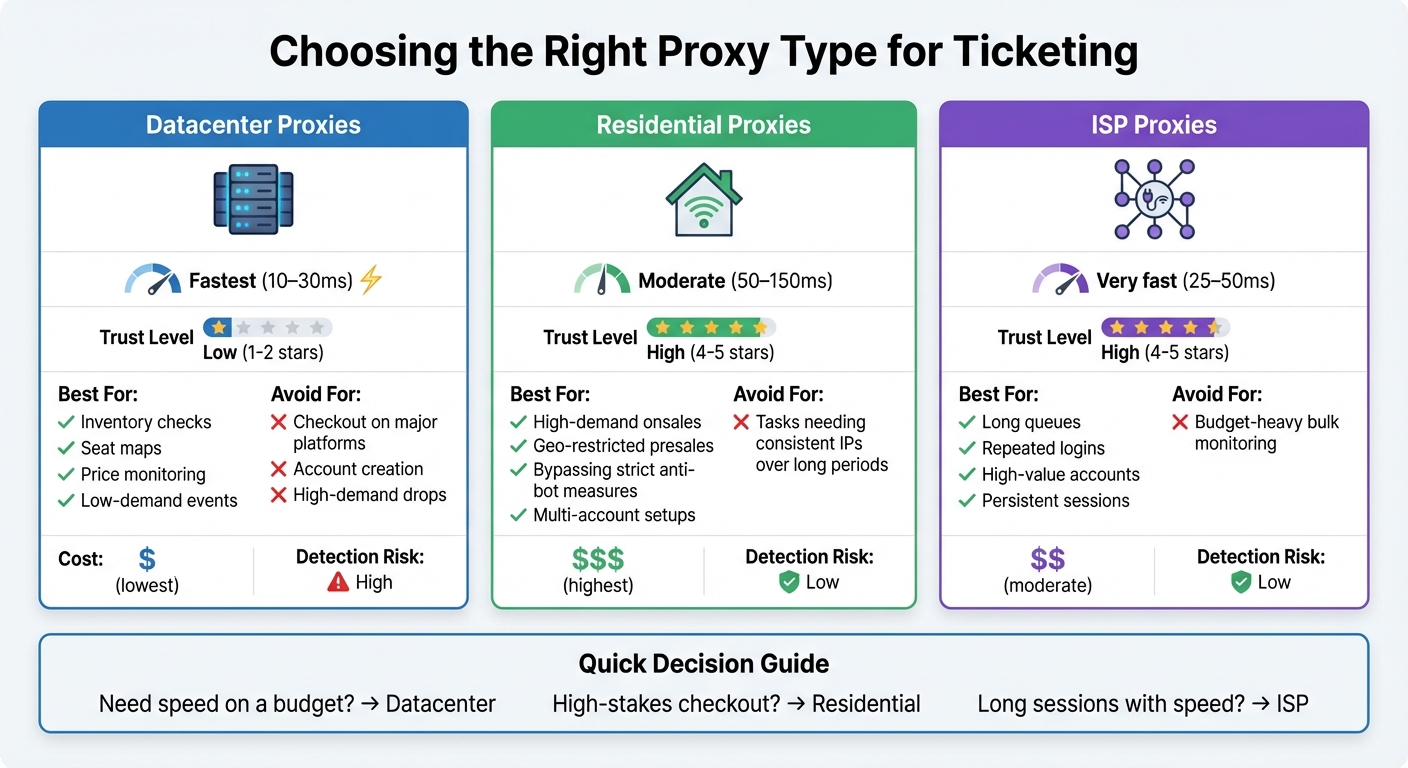
Proxy Types Comparison for Ticketing: Speed, Use Cases, and Performance
Picking the right proxy type is crucial when aiming to secure tickets on platforms like Ticketmaster, AXS, or SeatGeek. Your choice affects everything - from entering queues to holding seats and completing checkouts. Each proxy type offers a distinct balance of speed, trust, and resistance to detection, making it essential to align your choice with your specific ticketing goals. Let’s break down the options to help you decide.
Datacenter Proxies: Speed at a Low Cost
Datacenter proxies are known for their lightning-fast speeds and affordability, making them perfect for tasks that require quick data retrieval. They’re ideal for activities like loading seat maps, checking event inventory, monitoring ticket prices, or scraping public event data. If you’re working with smaller regional ticketing sites or presale pages with minimal bot detection, these proxies can handle the job effectively.
However, they struggle with platforms that employ advanced anti-bot measures. Using datacenter proxies for critical tasks like checkout, payment processing, or account creation often leads to CAPTCHAs, rate limits, or outright bans. This is especially risky during high-demand events, like a major concert tour or playoff game, where every second counts. For such cases, relying solely on datacenter proxies could jeopardize your success.
Residential Proxies: Realistic and Reliable
Residential proxies route your traffic through actual household connections provided by ISPs, making you appear as a typical home user. This significantly reduces the chances of CAPTCHAs, IP bans, or velocity checks. They also allow you to choose IPs from specific U.S. cities or regions, which is especially helpful for geo-restricted sales like "New York residents only" presales or local fan-club allocations.
Rotating residential proxies are great for initial queue entry and browsing, as they frequently change IPs to avoid rate limits and allow multiple accounts to join from different locations. For tasks like carting and checkout, sticky residential proxies are the better option. They maintain a consistent IP throughout the payment process, reducing the risk of session interruptions that could cost you your spot. This combination of flexibility and stability makes residential proxies the top choice for high-demand ticket drops and platforms with strict anti-bot measures.
ISP Proxies: The Best of Both Worlds
ISP proxies combine the speed of datacenter proxies with the authenticity of residential ones. These static IPs are registered to consumer ISPs but operate in high-performance environments, offering fast speeds while maintaining a high level of trust. Their stability makes them ideal for long queues, presale waiting rooms, and maintaining logged-in accounts over extended periods without triggering security alerts from constant IP changes.
Because ISP proxies are less commonly abused than datacenter IPs, they enjoy higher trust scores and lower block rates on ticketing platforms. They’re particularly useful for managing high-value accounts, such as fan club memberships or profiles tied to frequent purchases. With speeds ranging from 25–50ms and excellent reliability, ISP proxies are well-suited for persistent sessions and repeated logins.
Here’s a quick comparison to help you decide:
| Proxy Type | Best For | Avoid For | Typical Speed |
|---|---|---|---|
| Datacenter | Inventory checks, seat maps, price monitoring, low-demand events | Checkout on major platforms, account creation, high-demand drops | Fastest (10–30ms) |
| Residential | High-demand onsales, geo-restricted presales, bypassing strict anti-bot measures, multi-account setups | Tasks needing consistent IPs over long periods | Moderate (50–150ms) |
| ISP | Long queues, repeated logins, high-value accounts, persistent sessions | Budget-heavy bulk monitoring | Very fast (25–50ms) |
With your proxy type chosen, the next step is setting it up correctly and testing it thoroughly. Details on configuration and advanced strategies follow in the next section.
Setting Up Proxies for Ticket Purchasing
Configuring Proxies in Browsers and Software
To get started, open your computer's proxy settings. On Chrome or Edge, go to Settings → System, and on Firefox, navigate to Settings → Network Settings. Enter the details provided by your proxy service - this includes the host, port, username, and password. For most ticketing platforms, HTTP/HTTPS proxies work fine, but if SOCKS5 is supported, it can offer better security and speed. For instance, if your proxy provider gives you the following details: 192.0.2.10:8000 (host and port), user1 (username), and pass123 (password), input these into the designated fields. Save your settings and use an IP-lookup tool to verify the change. Then, load Ticketmaster or your chosen platform to check for any blocks or CAPTCHAs.
If you're using ticketing automation tools, they often come with proxy panels where you can upload a list in the IP:port:user:pass format. Stick to 1–3 accounts per IP for the best balance between speed and avoiding blocks. For smaller setups, using 50–100 residential or ISP proxies mapped to individual accounts with moderate thread counts works well. Providers like BirdProxies simplify the process by offering preformatted lists and API endpoints compatible with most automation software.
Lastly, make sure your proxy location aligns with the event's venue to avoid location-based restrictions.
Choosing Proxy Locations
The location of your proxy is a critical factor. Ticketing platforms often enforce geo-restrictions or local presale rules, so your proxy's IP should match the event's country and, ideally, the specific region or state. For example, if you're purchasing tickets for an event in California, using a proxy with an IP based in the US - preferably in California - can help you avoid unnecessary blocks. Always match the country and, when possible, the time zone of the event. Avoid sudden changes, like jumping between the US and Europe during a session, as this can trigger fraud alerts.
Consistency is key. Many providers, such as BirdProxies, offer IPs from multiple US locations as well as other countries like the UK, Germany, and France. This flexibility allows you to align your proxy with both the event location and your billing address, minimizing potential issues and improving connection speed.
Testing Proxy Performance
Once you've configured your proxies and aligned them with the event's location, it's time to test their performance. Ideally, you should test your proxies 24 hours before the ticket sale. Start by verifying the IP, checking latency, and running through a simulated purchase process. Aim for latency under 150ms to the ticketing site, and immediately discard any proxies that show frequent timeouts or connection errors.
It's also a good idea to test during the same time as the sale to identify issues like CAPTCHAs, "suspicious activity" warnings, or 403 errors. Replace any problematic proxies right away. Premium providers, such as BirdProxies, offer ISP and residential proxies optimized for low latency (typically 23–55ms) and consistent performance - essential when tickets sell out in seconds. Run a full rehearsal, including logging in, entering the queue, and holding items in your cart. This ensures your sticky session settings maintain the same IP throughout the checkout process, preventing disruptions that could cost you the tickets.
sbb-itb-ea6392c
Advanced Proxy Strategies for Ticketing
IP Rotation and Session Control
After setting up your proxies, it’s time to refine your strategy with advanced IP rotation and session controls. When it comes to buying tickets, knowing when to keep an IP stable or switch it up can make all the difference. For queue-based systems like Ticketmaster's Smart Queue, sticky sessions are a must. This means sticking with the same IP address from the moment you enter the queue until you’ve checked out. Switching IPs mid-queue can reset your position or raise red flags. On the flip side, rotating residential proxies work well for tasks like inventory monitoring, price checks, or managing multiple accounts. Each request appears to come from a different household, which helps maintain anonymity.
To keep activities separate, assign one residential or ISP IP to each account and use distinct browser profiles with separate cookies. This prevents platforms from connecting your actions across accounts. For platforms without queue systems or those with regional ticketing sites, you can use a more aggressive rotation strategy - switching IPs after a few searches or cart actions to avoid hitting rate limits. Providers like BirdProxies offer rotating proxy pools that let you configure intervals (per request or by timed sessions) and provide sticky residential and ISP options that hold the same IP for hours.
Another tip: avoid launching multiple sessions at the same time. Instead, stagger session start times by a few seconds to avoid patterns that might look automated. When switching to a new IP, clear cookies or use fresh browser profiles to maintain clean session integrity. These strategies help you stay undetected, which leads us to the next critical step.
Avoiding Detection and IP Bans
Ticketing platforms closely monitor IP activity, and overused or flagged IPs often lead to CAPTCHAs, manual reviews, or outright bans. To avoid this, stick to clean residential or ISP proxies, as they’re less likely to raise suspicion. BirdProxies, for example, offers a pool of high-trust IPs, reducing the risk of bans.
Another way to stay under the radar is by mimicking real user behavior. Use varied device fingerprints, such as different operating systems, browser versions, and screen resolutions. Match your proxy’s location with en‑US language settings and time zones, and avoid actions like refreshing pages too quickly or submitting forms instantly. Instead, log in a few minutes early, browse the event page naturally, and move through checkout at a steady pace. Aligning your billing address and ZIP code with your proxy’s location can also help minimize fraud alerts.
Before the sale, test your proxies thoroughly. Identify IPs that trigger CAPTCHAs or errors and replace them as needed. During the actual sale, watch for warnings or 403 errors and swap out problematic IPs immediately. With these precautions in place, you’ll be better equipped to handle the unique challenges of different ticketing platforms.
Platform-Specific Requirements
Every ticketing platform has its own quirks, so it’s important to adjust your approach accordingly. Ticketmaster, for instance, has some of the toughest anti-bot defenses, including Smart Queue, device fingerprinting, and strict rate limits. For this platform, rotating residential or ISP proxies with sticky sessions are critical during the queue and checkout stages. Additionally, ensure that each account is tied to a dedicated IP to maintain session consistency. Avoid datacenter proxies here - they’re often flagged quickly.
On platforms like AXS or smaller regional sites, the rules are typically less strict, but it’s still wise to use residential or ISP IPs with proper geo-targeting. These sites might tolerate slightly more aggressive rotation or higher concurrency, but a cautious and consistent approach is still your safest bet.
BirdProxies offers ticket-specific proxy solutions tailored to both monitoring and checkout needs. Their ISP proxies deliver response times as low as 23–55ms, which is crucial for securing tickets during high-demand drops. With multiple US locations available, you can easily geo-target your proxies to match the event venue, reducing the chances of location-based blocks.
Using BirdProxies for Ticketing
BirdProxies Products for Ticketing
When it comes to handling the challenges of high-demand ticket sales, BirdProxies offers tailored solutions designed specifically for platforms like Ticketmaster, Eventim, and Fansale. Their Ticket Proxies, optimized for speed and reliability, deliver impressive response times of 23–55 ms - giving you a critical edge in competitive ticket drops. Starting at just $1.62 per proxy per month, they provide an affordable way to monitor ticket availability and ensure smooth, secure checkouts.
Different tasks call for different proxy types. For instance:
- Residential proxies with sticky sessions are ideal for logging in, navigating queues, and completing checkouts without triggering CAPTCHAs.
- Fast datacenter proxies work best for monitoring ticket drops or scraping seat maps.
- Rotating proxy pools help manage multiple accounts and bypass IP restrictions effectively.
BirdProxies also offers unlimited bandwidth and free IP replacements. If an IP gets flagged during presale testing, you can swap it out instantly without incurring extra costs. With 99.99% uptime and multiple U.S. locations to choose from, you can geo-target your proxies to match event venues. This feature is especially useful for avoiding location-based blocks, such as restrictions on regional sales or locals-only presales.
Next, let’s dive into setting up these proxies for immediate use.
Setting Up BirdProxies
BirdProxies makes configuration simple through their user-friendly dashboard. Once you purchase proxies, you’ll receive credentials in a standard format (IP:port:username:password) compatible with most browsers and ticketing automation tools. For browser-based purchases, you can configure proxies directly in Chrome or Firefox using extensions or set them up in anti-detect browsers, which allow you to manage multiple profiles with unique IPs and fingerprints.
For automation users, BirdProxies offers API access, enabling seamless integration with ticketing bots or headless browsers. This lets you programmatically pull proxy lists, rotate IPs on a schedule, and track usage analytics in real time. If you’re preparing for U.S. ticket sales, make sure to configure your proxies with matching time zones and language settings (en-US). This alignment ensures consistency with your IP location and helps you avoid geo-targeting issues tied to event venues. Assigning one IP per account for critical actions like queue navigation and checkout maintains session integrity.
Once your proxies are set up, applying best practices will help you maximize performance during ticket drops.
Best Practices With BirdProxies
To keep your IP reputation clean, distribute your activity across BirdProxies' pools instead of overloading a single IP with too many concurrent accounts. Assigning one IP per account for essential steps like login and checkout helps maintain a "clean" status. You can reserve high-quality residential or ISP proxies for these critical flows while using faster datacenter proxies for tasks like monitoring inventory or scraping data.
Use the dashboard to monitor bandwidth and analyze usage patterns. Watch for unusual spikes, such as an IP triggering excessive CAPTCHAs or bots making too many requests per minute. Before major ticket drops, thoroughly test your proxies by checking latency to the ticketing domain, ensuring queue pages load correctly, and identifying any IPs that might need replacement.
User feedback on Trustpilot highlights BirdProxies' reliability, with comments like:
Never missed a drop with BirdProxies!
and
Proxies are fast and reliable. Never had any issues.
For IP rotation schedules, adopt a flexible approach. Use short intervals (per request or every 1–5 minutes) when monitoring inventory across multiple events. However, switch to longer sticky sessions (30–60+ minutes) during queues or checkout processes. This strategy helps you avoid rate limits during research while maintaining stable sessions that payment systems expect at checkout.
Conclusion
Getting those high-demand tickets often comes down to having the right proxy setup for each step of the process. For critical tasks like logging in, navigating queues, and completing checkouts, residential and ISP proxies should be your go-to tools. Meanwhile, datacenter proxies can take care of less risky activities, like monitoring inventory or tracking price changes across events. The key is matching the right proxy type to the specific demands of each stage in the ticket-buying journey.
When fine-tuning your strategy, opt for a provider that offers clean, reliable U.S. IP pools. Assign each account its own stable IP or session to ensure everything runs smoothly during checkout. Make sure to test your proxies well ahead of time - this helps you weed out underperforming IPs, tweak rotation schedules, and confirm payment processes work without a hitch. During live ticket sales, keep things realistic: limit how many requests you send per IP and add natural delays to mimic human behavior. Platforms like Ticketmaster are quick to flag rapid refreshes or excessive tab openings.
BirdProxies is a great example of the kind of performance you’ll need. Their ISP and residential proxies offer fast response times (23–55 ms), multiple U.S. locations, and unlimited bandwidth, making them ideal for queue navigation and checkout. Plus, their user-friendly dashboard allows for real-time monitoring and easy API integration, so you can scale from a handful of accounts to a larger operation without losing stability. Whether you’re grabbing a few seats for friends or managing multiple presales as a reseller, combining high-quality IPs with smart rotation and thorough testing can turn proxy setup into a real advantage.
Steer clear of free or public proxies - they’re shared, often blacklisted, and could cost you valuable opportunities. Instead, focus on maintaining clean IP pools, simulating human-like activity, and tailoring your setup to each platform’s rules and rate limits. By streamlining your proxy strategy - from selection to testing and rotation - you can avoid technical headaches and spend more time securing those must-have tickets when it counts.
FAQs
Why are residential proxies better than datacenter proxies for buying tickets?
Residential proxies work well for ticketing because they rely on real household IP addresses, which are generally trusted by ticketing platforms. This trust reduces the chances of being flagged or blocked, especially during high-demand ticket sales. Additionally, they are highly effective at navigating strict anti-bot measures and bypassing geo-restrictions, ensuring a smoother and more successful ticket-buying experience.
How do I choose the right proxy location to avoid geo-restrictions for an event?
To work around geo-restrictions, choose proxies with IP addresses that match or are close to the event's location. This makes your connection appear as though it's originating from the venue's region, lowering the risk of being blocked. Opting for a trustworthy proxy provider offering a variety of location options can make this process smooth and effective.
How can I prevent detection and IP bans when buying tickets online?
When buying tickets, it's crucial to avoid detection and potential IP bans. The best way to do this is by using high-quality residential proxies with options for rotating or sticky sessions. These proxies imitate real users, making it easier to bypass anti-bot systems. To stay unnoticed, mix up your request timing, steer clear of repetitive actions, and mimic natural human behavior. Opt for proxies that are fast and dependable to ensure smooth transactions without unnecessary delays.