

Proxies are essential for LinkedIn automation to ensure your activities remain undetected and compliant with LinkedIn's strict security measures. By masking your IP address and simulating natural user behavior, proxies help you manage multiple accounts, automate tasks like sending connection requests, and avoid account bans. Here's what you need to know:
- Why Proxies Matter: LinkedIn monitors IP addresses, session behavior, and login patterns. Proxies distribute activity across multiple IPs, reducing detection risk.
- Types of Proxies:
- Residential Proxies: Use real household IPs, ideal for outreach and account management ($8–$15/month).
- ISP Proxies: Offer stable, long-term connections with higher trust levels.
- Rotating Proxies: Automatically switch IPs for large-scale tasks like scraping data.
- Setup Tips:
- Assign one proxy per account to avoid linking accounts.
- Match proxy location with account settings to prevent "impossible travel" flags.
- Use sticky sessions for tasks requiring consistent IPs and rotating proxies for bulk activities.
Key Takeaway: Proxies, when configured correctly, allow you to automate LinkedIn tasks efficiently while minimizing detection risks. Services like BirdProxies provide tailored solutions for LinkedIn automation with dedicated IPs and multiple proxy types to suit your needs.
How we used multiple LinkedIn accounts to land 30+ new customers every month? [3 SECRET TIPS INSIDE]
Choosing the Right Proxy Type for LinkedIn
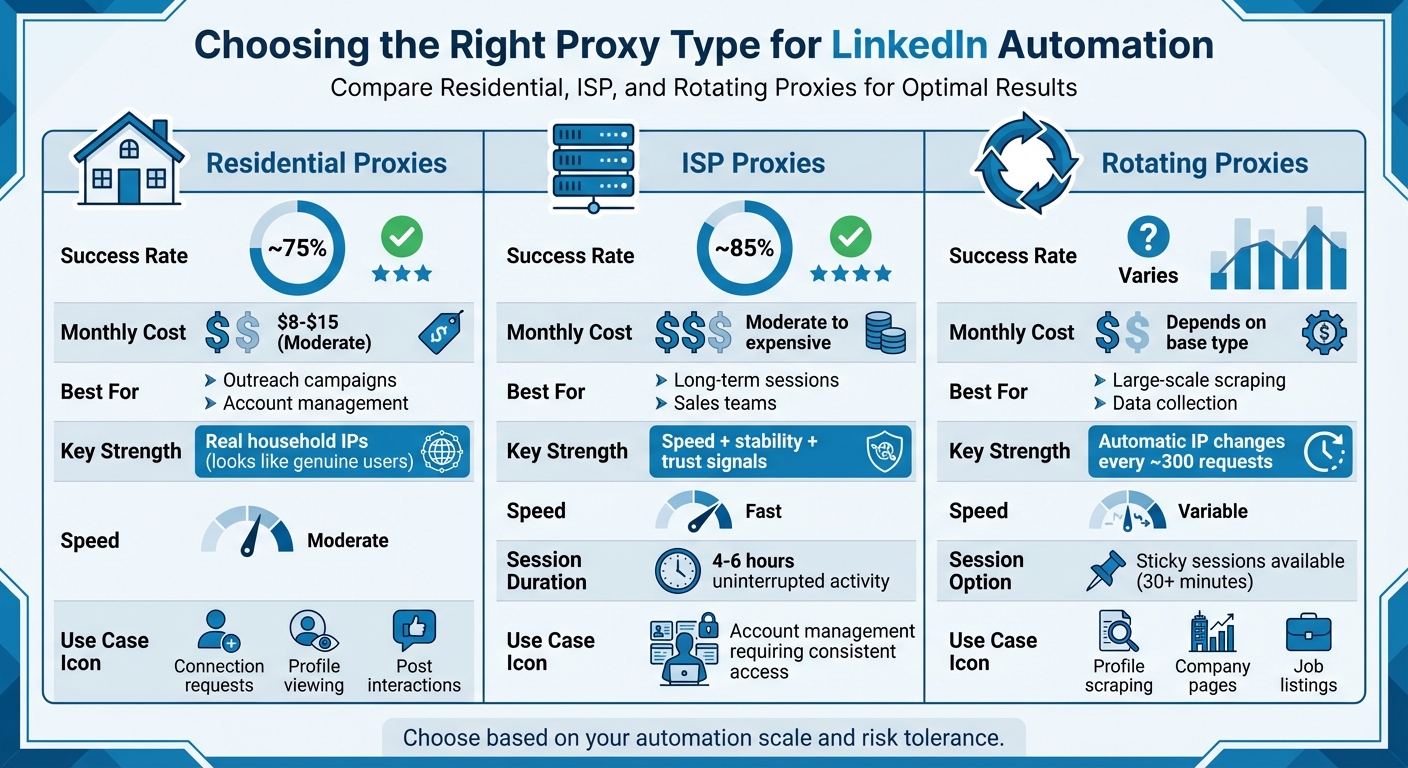
LinkedIn Proxy Types Comparison: Success Rates, Costs, and Best Use Cases
Picking the right proxy type can make or break your LinkedIn automation efforts. Each proxy type serves a unique purpose, and understanding their differences is key to selecting the best option for your needs. In the sections ahead, you'll learn how to configure these proxies in your LinkedIn automation tools.
Residential Proxies for LinkedIn
Residential proxies route your traffic through IP addresses assigned to real households by standard internet providers. To LinkedIn, this looks like genuine users browsing from their homes, making these proxies effective for tasks like sending connection requests, viewing profiles, and interacting with posts.
These proxies boast a success rate of around 75% for LinkedIn automation, meaning they often pass LinkedIn's security checks without raising red flags. Their realistic appearance makes them especially useful for outreach campaigns and managing multiple accounts where maintaining trust is crucial.
However, residential proxies come with trade-offs. They're priced between $8 and $15 per month, depending on bandwidth usage, and their speeds are moderate. That slower pace can actually work in your favor, as it mimics natural user behavior, reducing the risk of detection.
ISP Proxies for Long-Term LinkedIn Sessions
ISP proxies, also known as static residential proxies, merge the speed of datacenter proxies with the authenticity of residential IPs. These proxies are issued directly by internet service providers and remain stable over extended periods, making them ideal for managing accounts that require consistent, long-term access.
With a success rate of about 85%, ISP proxies offer fast connections while providing the trust signals LinkedIn's systems look for. Their stability allows for 4–6 hours of uninterrupted LinkedIn activity, helping to build a strong IP reputation.
Rotating Proxies for Large-Scale Automation
Rotating proxies automatically switch your IP address after each request or at set intervals, imitating natural browsing patterns. This dynamic behavior makes them a great fit for large-scale tasks like scraping thousands of LinkedIn profiles, company pages, or job listings.
By distributing requests across multiple IPs, rotating proxies help you sidestep LinkedIn's rate limits and avoid detection. After approximately 300 requests, a new IP is assigned, ensuring your automation campaign maintains a human-like pace. For account-specific tasks requiring a steady session, "sticky sessions" can hold the same IP for 30 minutes or more, reducing the risk of triggering LinkedIn's security systems.
| Proxy Type | Success Rate | Best For | Key Strength | Monthly Cost |
|---|---|---|---|---|
| Residential | ~75% | Outreach, account management | Real household IPs | $8–15 |
| ISP | ~85% | Long-term sessions, sales teams | Speed, stability, and trust | Moderate to expensive |
| Rotating | Varies | Large-scale scraping, data collection | Automatic IP changes | Depends on base type |
Setting Up Proxies for LinkedIn Automation
Once you've chosen the right proxy type, it's time to configure your setup to keep your accounts secure and simulate natural user behavior.
Using One Proxy Per Account
To keep your LinkedIn accounts safe, assign a dedicated proxy to each account. Why? When multiple accounts operate under the same IP address, LinkedIn can link them together, flagging the group as suspicious. In fact, research shows that using dedicated proxies reduces account suspensions by 70% compared to shared proxies.
Dedicated proxies ensure that each account operates independently, avoiding cross-account activity that could raise red flags.
It's also important to match your proxy's location with your LinkedIn account settings. For example, if your LinkedIn profile says you're in Chicago, use a proxy from the Chicago area. Logging in from distant locations in a short time frame can trigger LinkedIn's security protocols, which monitor for "impossible travel" scenarios.
Configuring Proxies in Automation Tools
Most automation tools make it simple to configure proxies. You'll typically need to input four key details: IP address (or hostname), port number, username, and password. These settings are usually found in a dedicated section in your tool's interface.
For better performance and lower detection risk, choose the SOCKS5 protocol, as it supports a wider range of communication methods.
Another critical step is blocking WebRTC leaks, which can expose your real IP address even when you're using a proxy. Many automation tools and anti-detect browsers include an option to block WebRTC, so make sure this feature is enabled.
Finally, double-check that your time zone, language settings, and browser fingerprint align with your proxy's location. For instance, if your proxy is based in Dallas, ensure your browser and LinkedIn account settings reflect that region to maintain consistency.
Managing Proxy Sessions for LinkedIn Tasks
How you manage proxy sessions can make or break your LinkedIn automation efforts. For tasks like sending connection requests or messages, use sticky sessions that keep the same IP address for at least 30 minutes. This builds trust and reduces the likelihood of detection.
However, avoid keeping sticky sessions active for too long - 4 to 6 hours is a good limit. Prolonged static sessions can appear unnatural. After completing tasks, log out and take short breaks to further minimize detection risks.
For large-scale activities like data scraping, rotating proxies are a better choice. These proxies switch IP addresses at regular intervals, spreading your requests across multiple IPs. This approach helps you stay within LinkedIn's rate limits. To avoid triggering velocity alerts, keep your actions moderate - around 30–50 connection requests and 100–150 messages per day.
sbb-itb-ea6392c
Avoiding Detection and LinkedIn Bans
LinkedIn employs sophisticated systems to monitor user behavior and IP activity, aiming to identify and restrict automation practices. Statistics show that up to 95% of users who don't configure their automation tools properly face restrictions early on. Understanding these triggers is key to setting up your system in a way that mimics natural, human behavior.
LinkedIn Detection Signals to Avoid
LinkedIn looks for specific patterns that suggest bot activity. Uniform, repetitive actions are a major red flag. For example, rapid IP changes can trigger suspicion - if an account logs in from one location and shortly after from a far-off region, it might be flagged for "impossible travel." Another clear signal is sending an unusually high number of connection requests, such as 200 in a single hour, which clearly points to automation. Additionally, running multiple accounts on the same /24 subnet increases the risk of detection, as LinkedIn may identify this as clustering.
Best Practices for Safe LinkedIn Automation
To stay under LinkedIn's radar, focus on replicating the behavior of a typical user. Start by gradually "warming up" new accounts. Instead of diving into heavy activity right away, begin with light actions like updating your profile, viewing a few profiles, and interacting with posts. Slowly increase your activity over a couple of weeks.
Randomizing your activity is another critical step. Real users don't operate on perfectly fixed schedules, so vary your timings and take breaks between actions. Also, ensure your activity aligns with your account's usual time zone to avoid raising suspicion.
"Never share the same proxy across multiple accounts. LinkedIn easily detects cross-traffic and flags it as bot-like behavior. A clean proxy configuration means one proxy = one account." - Linked Helper
Keep a detailed record of which proxy is assigned to which account. If you need to switch proxies, do so sparingly and with caution, as sudden changes can draw LinkedIn's attention.
How BirdProxies Reduces Detection Risk
BirdProxies takes proxy configuration to the next level, reducing detection risks significantly. They offer exclusive, high-trust IP pools, giving you the option of a dedicated IP address that's used only by you. This eliminates the risk of another user's activity impacting your account's reputation. Their ISP and residential proxies provide the kind of stability and authenticity LinkedIn associates with real users. Plus, with optimized routing and low latency, your automated actions happen at speeds that feel natural, avoiding the overly rapid behavior that raises red flags.
Conclusion
Key Takeaways
Streamlining LinkedIn tasks through automation requires careful planning and the right tools. Start by selecting proxies that suit your task scale and risk tolerance. Configure them to replicate human-like behavior, and stick to best practices to avoid detection. Key tips include using one proxy per account, warming up new accounts gradually, randomizing activity timing, and keeping usage within sensible limits. These steps help maintain account safety while automating efficiently.
Why Choose BirdProxies?
When it comes to LinkedIn automation, BirdProxies stands out as a top choice. They offer dedicated, non-shared IPs to safeguard your account reputation. With high-performance ISP and private residential proxies, BirdProxies ensures optimized routing and low latency, enabling your automated actions to mimic natural speeds. Whether you're managing a handful of accounts or executing large-scale outreach efforts, BirdProxies provides the reliable connections needed for smooth and secure automation.
FAQs
What’s the difference between residential, ISP, and rotating proxies for LinkedIn automation?
Residential proxies come with IP addresses assigned to actual households, making them look genuine and less likely to trigger any red flags. ISP proxies, however, are linked directly to internet service providers. These offer stable, reliable connections that LinkedIn typically recognizes as legitimate. Then there are rotating proxies, which frequently change their IP addresses. While this helps maintain anonymity and lowers the chance of detection, it can sometimes interrupt tasks that need a steady session.
When it comes to LinkedIn automation, the best proxy option depends on your goals. Residential proxies work well if you want to mimic real user behavior, ISP proxies are perfect for consistent and reliable performance, and rotating proxies shine when handling high-volume tasks that demand extra anonymity.
What’s the best way to set up proxies for LinkedIn automation while avoiding detection?
To keep your LinkedIn automation under the radar, it's crucial to use residential or mobile proxies with dedicated IPs that aren’t shared with others. For tasks requiring high volume, rotating proxies is a smart choice, but for steady, consistent activity, static proxies work best. Make sure the proxies you select have IP addresses that align with your target region to avoid drawing attention.
It's also important to replicate natural human behavior. Use realistic timeouts between actions and steer clear of overly aggressive automation. Keep a close eye on your activity to identify any unusual patterns that might alert LinkedIn’s detection systems. These strategies can help safeguard your account while allowing you to automate tasks more efficiently.
Why should you use a dedicated proxy for each LinkedIn account?
Using a separate proxy for each LinkedIn account is crucial for keeping your accounts secure and avoiding detection. Assigning a unique IP address to each account replicates the behavior of genuine users, reducing the chances of LinkedIn identifying your activity as unusual.
If multiple accounts share the same proxy, overlapping usage patterns can emerge. This might alert LinkedIn's automated systems, potentially leading to account restrictions or even bans. By using dedicated proxies, you ensure your accounts stay secure, maintain consistency, and appear natural during automation or networking activities.