

If you’re managing over 50 accounts on platforms like OnlyFans, Instagram, or TikTok, proxies are essential to avoid bans. Platforms track IP addresses to detect suspicious activity, so logging into multiple accounts from the same IP can lead to permanent bans. Proxies solve this by assigning a unique IP to each account, making them appear as separate users. Here’s what you need to know:
- Proxies mask your IP to prevent detection and bans.
- Residential and mobile proxies are the most trusted by platforms since they use IPs tied to real locations.
- ISP proxies offer stability and speed, ideal for long-term account management.
- Avoid using datacenter proxies for high-value accounts as they are easier to detect.
- Always assign one proxy per account and warm up your accounts by mimicking natural user behavior.
For large-scale operations, proxies are a must to ensure smooth account management and prevent disruptions.
Why You Need Proxies to Run 50+ Accounts Without Getting Banned
What Happens When You Run Multiple Accounts Without Proxies
Managing multiple accounts without proxies puts your entire operation at risk. When you log into several accounts from the same IP address, platforms quickly flag this as suspicious activity. This can trigger linked bans, wiping out all your accounts in one go. The fallout? Wasted ad spend, disrupted campaigns, and lost revenue - issues that can take days or even weeks to fix.
Another common problem is hitting the request limit of a single IP. This results in "Too Many Requests" errors that bring your automation tools to a standstill, halting your workflow and leaving your systems idle.
These challenges make proxies essential for anyone running multiple accounts effectively and securely.
How Proxies Make Your Activity Look Natural
Proxies solve these problems by assigning each account its own unique IP address. This makes every account appear as if it belongs to a separate, real user logging in from different locations. For example, one account might log in from New York, while another connects from Dallas. To the platform, they look like entirely unrelated users.
The use of residential or mobile proxies takes this a step further. These proxies provide IP addresses assigned by real ISPs or mobile carriers, which platforms inherently trust. Unlike datacenter IPs, residential and mobile proxies mimic the behavior of actual home users or mobile traffic, significantly increasing your credibility. In fact, rotating residential proxies can boost your success rates to an impressive 99.2% or higher.
"Using a cheap datacenter proxy to manage a high-value social media account... is an expected result when cost savings compromise security." - OnlineProxy.io
Proxies also prevent rate limit errors by spreading your requests across thousands of different IPs. This ensures your automation tools can handle tasks like posting, following, and scraping without interruptions. Ultimately, proxies keep your accounts active and your operations running smoothly, even on a large scale.
Proxy Tips for Affiliates: Manage Multiple Accounts Like a Pro! - Stan Sadokov
Which Proxy Type to Use for Your Accounts
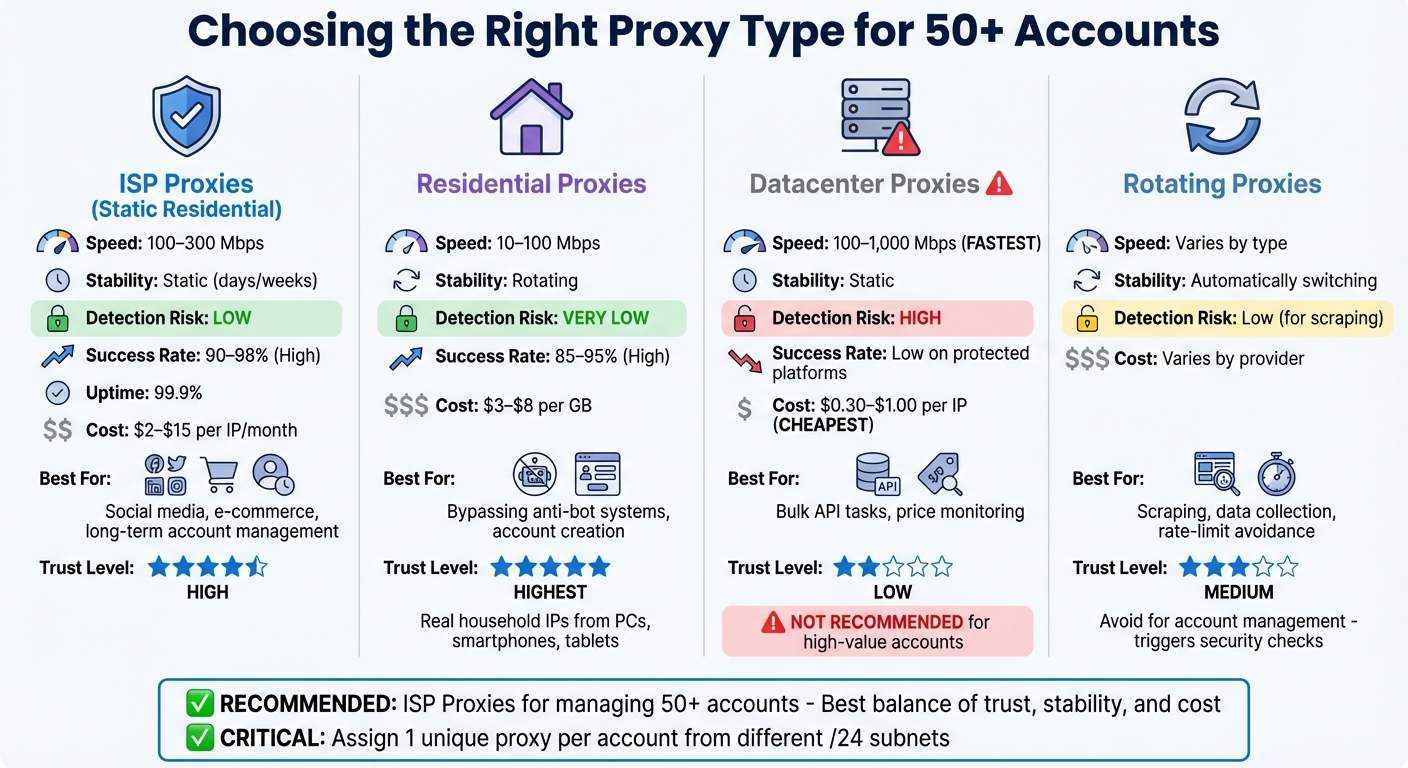
Proxy Types Comparison for Multi-Account Management
If you're managing over 50 active accounts and want to avoid bans, selecting the right proxy type is critical. Each proxy type serves different needs, so it's important to match your choice with your specific account management tasks. Let’s break down how these proxies work and what they’re best suited for.
When stability is your top priority, ISP Proxies (also called static residential proxies) are a solid choice. They combine the speed of datacenter infrastructure with the authenticity of consumer ISP connections. These proxies offer speeds between 100–300 Mbps, boast success rates of 90–98% on platforms with strict protections, and maintain a 99.9% uptime. This makes them ideal for managing social media or e-commerce accounts where consistent, long-term sessions are essential.
Residential Proxies, on the other hand, use IP addresses from real household devices like PCs, smartphones, and tablets. Because these IPs originate from genuine devices, platforms tend to trust them more. They achieve success rates of 85–95% on protected sites. However, since these proxies often rotate IPs, they might disrupt account sessions if the IP changes mid-use.
For tasks requiring speed and affordability, Datacenter Proxies are worth considering. They deliver some of the fastest speeds - ranging from 100 to 1,000 Mbps - and are priced between $0.30 and $1.00 per IP. These proxies are great for high-volume tasks like bulk API requests. However, their structured subnets make them easier to detect, leading to lower success rates on platforms with strong protections. As a result, they’re not recommended for managing high-value accounts like those in social media or e-commerce.
If your operations involve frequent IP changes, Rotating Proxies might be the way to go. These proxies automatically switch IPs either per request or after set intervals, helping bypass rate limits during continuous tasks. They’re ideal for scraping or data collection. However, for account management, where maintaining a consistent online identity is crucial, these sudden IP changes can trigger security checks.
Here’s a quick comparison to help you decide:
| Feature | ISP Proxies | Residential Proxies | Datacenter Proxies | Rotating Proxies |
|---|---|---|---|---|
| Speed | 100–300 Mbps | 10–100 Mbps | 100–1,000 Mbps | Varies by type |
| Stability | Static (days/weeks) | Rotating | Static | Automatically switching |
| Detection Risk | Low | Very low | High | Low (for scraping) |
| Best For | Social media, e-commerce | Bypassing anti-bot systems | Bulk API tasks | Scraping, data collection |
| Typical Cost | $2–$15 per IP/month | $3–$8 per GB | $0.30–$1.00 per IP | Varies by provider |
When managing 50+ accounts, it’s crucial to assign a unique proxy to each account. Additionally, ensure your proxies come from different /24 subnets. If all your IPs are within the same subnet, a single block could jeopardize your entire operation. Up next, we’ll dive into how to configure these proxies for smooth account management.
sbb-itb-ea6392c
How to Set Up Proxies for Managing Multiple Accounts
Setting Up Proxies in Browsers and Automation Software
Most automation tools let you import proxies in bulk using formats like host:port:user:pass or protocol://host:port:user:pass. To avoid IP overlap, assign a unique proxy to each browser profile. This step is critical to prevent platforms like Facebook, TikTok, and Google from flagging suspicious activity.
For better security and anonymity, opt for SOCKS5 proxies. Before starting any session, use your software's built-in "Check Proxy" or "Test Connection" feature. Ideally, you want latency under 200ms and a clean IP status.
To ensure your browser profile aligns with the proxy's IP location, match settings like timezone, WebRTC, geolocation, and language. A mismatch - such as using a New York IP with a London timezone - can trigger platform detection systems.
Once your proxies are configured, the next step is to warm them up to build a natural browsing history.
Warming Up Your Proxies to Build Trust
When working with new accounts, it's important to warm them up over a 7–10 day period to establish trust.
Start by using the proxy to browse various websites and collect cookies, but avoid logging into your target platform right away. Adding cookies to your browser profiles mimics real user behavior and helps reduce detection risks.
After creating some browsing history, you can gradually begin using your accounts. Avoid high-volume activities like running ads or bulk messaging during the first few days. Instead, ease into it with simple actions like scrolling, liking posts, or making small updates. Gradually increase your activity over the 10-day warm-up phase.
For platforms like TikTok and Instagram, mobile (4G/5G) proxies can be especially helpful during this process. They mimic real smartphone users, which tends to carry a higher trust score. Additionally, ensure that your proxy location, phone number country code, and payment method all match the same region to avoid raising red flags.
After warming up your proxies, you'll need to monitor their performance to maintain reliability and avoid detection.
Tracking Proxy Performance and Avoiding Detection
Regular monitoring is essential to keep your proxies running smoothly. Check them nightly to identify and replace any dead or blacklisted IPs. Errors like "Failed to get IP data" usually indicate that a proxy has run out of traffic or stopped responding.
To validate your proxy setup, use tools like ipinfo.io or whoer.net. These can confirm the IP region and check for blacklist status. Be on the lookout for DNS and WebRTC leaks, as these can expose your actual IP address even when using a proxy. To prevent WebRTC leaks, disable WebRTC in your browser settings or use an extension.
For account logins, it's best to use sticky sessions rather than rotating proxies. Rotating proxies are better suited for high-volume tasks like scraping.
If you're managing a large number of accounts - 50 or more - distribute traffic across multiple proxies to avoid overloading any single one. For example, spreading 50,000 requests across 100 proxies can reduce average latency by 40%, bringing it down from 1.5 seconds to 0.9 seconds. This strategy helps maintain account integrity and reduces the risk of bans.
Choosing the Right BirdProxies Plan for Your Budget and Scale
BirdProxies Plans: Features, Pricing, and Best Uses
When managing 50+ accounts, selecting the right proxy type is crucial - not just for avoiding bans but also for keeping costs under control. For instance, ISP proxies are priced at $1.30 per IP and offer long-term session stability. These proxies maintain a consistent identity, which helps avoid "impossible travel" flags caused by abrupt IP location changes.
On the other hand, residential proxies start at $4.25 per GB. They use real household IPs, which come with high trust scores. This makes them ideal for creating new accounts or bypassing strict anti-bot systems. Rotating proxies are a cost-effective choice for high-volume scraping, but keep in mind that bandwidth-based billing can add up quickly during data-heavy operations.
Meanwhile, datacenter proxies provide fast performance at a lower cost. However, they can often be flagged as coming from server farms rather than individual users. These work well for less sensitive tasks like price monitoring but are not recommended for managing social media accounts due to higher detection risks.
| Proxy Type | Starting Price | Best For | Key Advantage |
|---|---|---|---|
| ISP Proxies | $1.30/IP | Long-term account management | Session stability and high trust |
| Residential Proxies | $4.25/GB | Account creation and anti-bot bypass | Highest legitimacy with real home IPs |
| Datacenter Proxies | Competitive | High-speed scraping and load testing | Fast performance at a low cost |
| Rotating Proxies | Varies | Bulk data extraction and rate-limit avoidance | Automatic IP switching |
This breakdown shows why ISP proxies are often the go-to choice for managing 50+ accounts. They combine high trust with flat per-IP pricing, avoiding the escalating bandwidth costs of residential proxies.
Getting More Value from Your Proxy Plan
Picking the right proxy type is just the first step. To truly get the most out of your plan, you need to optimize how you use your proxies. For example, limit each proxy IP to just 1–2 accounts. Overloading a single IP with 5+ accounts increases the risk of chain bans - if one account is flagged, all linked accounts might be compromised.
For GB-based plans, block unnecessary assets like images, fonts, and videos. This simple step can significantly cut down on your bandwidth usage. Additionally, setting spending caps - whether daily or weekly - can help prevent "retry storms" that rack up costs unnecessarily.
"Reducing retries via better identity strategy and pacing usually saves more money than switching providers."
- Marcus Eriksson, Cybersecurity Analyst
Another tip: use sticky sessions (where the same IP remains active for up to 24 hours) for activities like account logins and management. Save rotating IPs for scraping tasks. This strategy minimizes bandwidth waste while maintaining the consistent digital fingerprint that platforms expect from real users. Finally, track your "cost per success" rather than just focusing on price per GB - this gives a clearer picture of value.
Conclusion
Successfully managing 50+ accounts without triggering bans comes down to three key actions: selecting the right proxy type, setting it up properly, and tailoring your plan to meet your specific needs. For managing high-value accounts, residential and ISP proxies offer a level of trust that’s hard to beat. While datacenter proxies are more budget-friendly, their social media success rates often drop below 5% due to a higher likelihood of detection.
Maintaining a 1:1 account-to-IP ratio is essential for avoiding linked bans. Combine this strategy with fingerprint isolation using antidetect browsers to create the kind of digital identity platforms expect from genuine users. Even the most reliable proxies won’t protect you if this setup is neglected. Pair these measures with proper session management to complete your defense system.
In addition, use sticky sessions and ensure your proxies align geographically with your target audience. This helps mimic natural user behavior and aligns with platform expectations.
"One blocked account can throw off an entire workflow - wasted spend, delayed launches, and lost sales that could take days to recover." - Multilogin
To build a scalable and dependable operation, follow these best practices. Gradually warm up your accounts, test your setups using IP and fingerprint checkers, and replace any unstable IPs immediately. The ultimate goal isn’t just avoiding bans - it’s creating a system that grows sustainably without constant disruptions.
FAQs
How do proxies help prevent account bans on social media?
Proxies are a smart way to avoid account bans by hiding your actual IP address and assigning distinct IPs to each account. This setup makes it seem like every account is being accessed from a different location and device, which helps sidestep detection by platforms that monitor for multiple accounts using the same IP. Residential proxies stand out because they use real IP addresses provided by internet service providers, making your activity appear like it’s coming from a regular user.
On top of that, rotating proxies take things a step further by frequently switching IP addresses. This prevents platforms from spotting patterns that might signal automated or bot-like behavior. The constant rotation keeps your accounts off the radar and minimizes the chances of getting flagged. By combining unique IPs, regular rotation, and reliable residential sources, proxies help keep your accounts safe and running smoothly without drawing unwanted attention.
What’s the difference between residential, ISP, and datacenter proxies?
Residential, ISP, and datacenter proxies each have distinct characteristics based on how their IP addresses are sourced. These differences affect their reliability, speed, and price, so choosing the right type depends on your specific needs.
Residential proxies use IP addresses from real household internet connections. Because they appear as genuine users, they are highly trusted and tough to detect. This makes them perfect for sensitive tasks like managing social media or e-commerce accounts. However, they tend to be slower and come with a higher price tag.
ISP proxies offer static IPs provided by internet service providers but are hosted on servers. They strike a balance between reliability and detection risk. These proxies work well for tasks that require some level of credibility, such as bulk data collection.
Datacenter proxies are generated from servers or cloud providers and aren’t tied to physical households. They are the fastest and most cost-effective option, but they’re also easier to detect and block. This makes them a good choice for low-risk activities like large-scale web scraping.
Ultimately, the right proxy depends on your priorities - whether it’s stealth, speed, or staying within a budget.
How do I properly set up proxies to manage multiple accounts without getting banned?
To handle 50+ accounts without running into bans, it's crucial to assign each account its own dedicated, high-quality proxy. For high-risk accounts, residential or ISP proxies are ideal because they closely resemble real user behavior. On the other hand, datacenter proxies are more prone to being flagged. Use a proxy manager to ensure each account gets a unique proxy. For actions like logging in, opt for sticky sessions to keep a consistent IP. For tasks that can tolerate frequent IP changes, rotating sessions are your best bet.
Before putting your proxies to use, take the time to test them. Check that the external IP matches the expected location, ensure no identifying headers (like X-Forwarded-For) are leaking, and confirm the connection is secure. Keep an eye out for CAPTCHAs or errors, as these could signal issues with your proxies. Replace any proxies that aren't performing well, and avoid assigning too many accounts to a single IP. Lastly, refresh your proxy pool regularly to maintain reliability and performance. Following these practices will help you manage your accounts smoothly and avoid bans.