

Managing multiple OnlyFans accounts can be tricky due to strict monitoring of IP addresses, browser fingerprints, and geo-restrictions. Tools like anti-detect browsers and proxies help by creating separate digital identities for each account, ensuring they appear as if managed on different devices. Here's a quick breakdown:
- Challenges: OnlyFans tracks IPs, browser fingerprints, and enforces geo-restrictions in certain countries.
- Solution: Use anti-detect browsers to isolate account profiles and residential vs ISP proxies to mask IP addresses.
- Setup Steps:
- Sign up for a proxy service (e.g., BirdProxies).
- Configure proxies in an anti-detect browser.
- Assign unique proxies to each account for separation.
- Test the setup and ensure proper configuration.
This approach ensures account safety, prevents bans, and allows seamless management of multiple profiles.
How Anti-Detect Browsers and Proxies Work
What Are Anti-Detect Browsers?
Anti-detect browsers are designed to counteract OnlyFans' advanced detection systems. These browsers create isolated virtual profiles that function like entirely separate devices. Each profile operates in a sandboxed environment, maintaining its own cookies, cache, and browsing history. This isolation ensures that each account remains independent. Additionally, these browsers replace your device's fingerprint with a randomized identity by tweaking over 25 technical parameters per profile. These parameters include details like User-Agent strings, screen resolution, fonts, Canvas, WebGL, WebRTC, and audio context settings.
"An antidetect browser hides your real browser fingerprint and creates a new one for each profile." – Gayane G., Content Creator, Multilogin
More advanced anti-detect browsers take it a step further by aligning internal settings - such as timezone, language preferences, and geolocation - with the region of your proxy. For instance, if your proxy is based in Texas, the browser adjusts these settings to match that location.
Now, let’s look at how proxies work alongside these browsers to fully mask your digital footprint.
How Proxies Protect Your Identity and Location
Proxies play a critical role in masking your online identity by routing your internet traffic through a remote server. This process hides your actual IP address and allows you to appear as though you're browsing from a different location. Since platforms like OnlyFans rely heavily on IP addresses for tasks like geo-targeting, rate-limiting, and identifying multiple accounts, proxies are essential.
Residential proxies are particularly effective because they use IP addresses assigned by real internet service providers, making them nearly indistinguishable from regular home connections. Some premium providers offer access to over 30 million residential IPs across 150+ countries, with 95% of these IPs remaining free of blacklists.
Mobile proxies, which leverage 4G or 5G connections, offer even greater anonymity. These are especially useful for accessing geo-blocked content in regions where OnlyFans access is limited.
On the other hand, datacenter proxies are faster and more affordable but are easier to flag as artificial traffic since they don’t originate from real residential ISPs. To maintain complete account isolation and avoid chain bans, it’s crucial to assign a unique residential or mobile proxy to each browser profile.
sbb-itb-ea6392c
How to Set Up BirdProxies for OnlyFans
Step 1: Sign Up for BirdProxies and Select a Plan
Start by signing up on BirdProxies. For managing OnlyFans accounts, residential proxies are a great option as they use real home IPs, making your traffic appear legitimate and reducing the chance of bans. BirdProxies offers flexible pricing, starting at $5.00 per GB, with discounts for higher volumes (e.g., $4.75/GB for 5 GB, $4.50/GB for 10 GB, and $4.25/GB for 25 GB). If you need stable, long-term access, consider their ISP proxies, which provide dedicated IP addresses and cost between €1.30 and €1.35 per IP per month. For regions with stricter restrictions, mobile proxies offer greater anonymity, but they come at a higher price.
Once you've chosen the plan that suits your needs, you'll be ready to retrieve your proxy credentials.
Step 2: Retrieve Your Proxy Credentials
After purchasing your plan, log in to the BirdProxies dashboard and go to your active proxy list. Here, you'll find your proxy credentials: the IP address, port number, username, and password. These credentials are activated immediately after payment. If you're using residential proxies, enable sticky sessions to keep the same IP for 24 hours, which helps mimic natural browsing behavior.
Step 3: Configure Proxies in Your Anti-Detect Browser
Open your anti-detect browser and create a new profile. Navigate to the proxy settings within the profile, select the appropriate proxy protocol, and enter the credentials you got from BirdProxies. The browser will automatically adjust settings like timezone, language, and geolocation to match the proxy. Be sure to assign a unique proxy to each OnlyFans account to avoid linking them together.
Step 4: Test and Fine-Tune Your Setup
Before you start using OnlyFans, test your proxy connection to ensure everything is working properly. Use your browser's "Check Proxy" feature to verify connectivity. If you encounter errors, double-check your credentials or refresh the proxy. Once the connection is successful, confirm your IP and location using a tool like WhatIsMyIPAddress.com.
If you still face restrictions on OnlyFans, clear your browser profile's cache and restart the connection. Stick with the same proxy throughout your session to avoid triggering security flags. By following these steps, you’ll ensure each OnlyFans account has its own distinct digital identity, keeping your operations secure and compliant.
How To Setup An External Proxy To AdsPower Anti-Detect Browser
Tips for Managing OnlyFans Accounts Safely
Proxy Types Comparison for OnlyFans Account Management
Once you've set up a secure foundation using BirdProxies and anti-detect browsers, you can take additional steps to ensure the safety of your OnlyFans account management. Here are some practical tips to keep everything running smoothly and securely.
Set Up Separate Profiles for Each Account
To manage multiple OnlyFans accounts safely, create a unique profile for each one. Each profile should have its own digital fingerprint and a dedicated proxy from BirdProxies. These profiles act like independent devices, keeping cookies, browsing history, and cache isolated from one another. Assign a unique BirdProxies IP address to every profile to prevent accounts from being linked. Also, make sure the timezone and language settings in your browser match the proxy's location - any mismatch could trigger security alerts.
"Each profile works like a different computer. Cookies, history, and logins stay inside that profile, so accounts never cross." - Multilogin
This setup not only keeps your accounts separate but also protects them from cascading bans if one account gets flagged. To further strengthen this separation, use different email addresses and payment methods for each account.
Once your profiles are set up, the next step is to choose the best proxy type for your needs.
Select the Right Proxy Type for Your Use Case
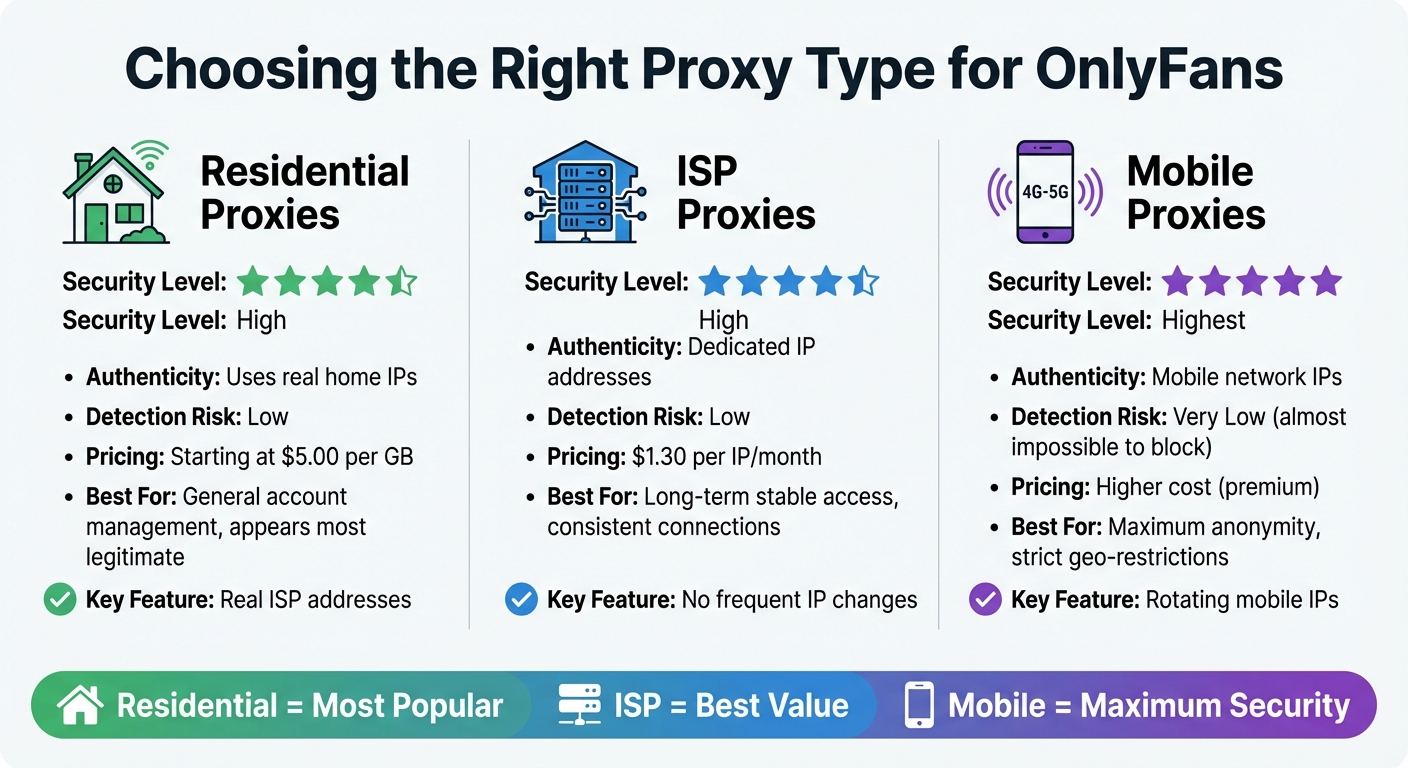
The type of proxy you use plays a big role in maintaining account security. Here’s a breakdown of the options:
- Residential proxies: These are the safest choice because they use IP addresses from actual home internet connections, making your traffic appear legitimate. BirdProxies offers residential proxies starting at $5.00 per GB.
- ISP proxies: These provide stable, dedicated IP addresses, making them ideal for long-term account management. BirdProxies offers ISP proxies at $1.30 per IP per month, ensuring consistent access without frequent IP changes.
- Mobile proxies: These offer the highest level of anonymity since mobile networks frequently rotate IP addresses, making them almost impossible to block. While they are more expensive, they’re perfect for situations requiring maximum security.
Using one of these proxy types ensures your accounts maintain authenticity and trustworthiness.
Track Your Usage and Follow Platform Rules
After setting up your profiles and proxies, it’s important to monitor your activity to maintain secure and consistent connections. Use the BirdProxies dashboard to keep track of your bandwidth usage so you don’t run out during critical moments. Enable sticky sessions for up to 24 hours to mimic natural browsing behavior and reduce the likelihood of triggering security alerts.
When creating new accounts, space out the process over several days or weeks instead of doing it all at once. Warm up each profile with natural browsing to build up cookies before engaging in heavy activity. Avoid logging into multiple accounts too quickly, as this can raise red flags. If you encounter a verification prompt, don’t repeatedly retry - this can escalate security alerts. Always follow OnlyFans' terms of service, and remember that while managing multiple accounts is allowed, each one must go through its own verification process.
Conclusion
Managing multiple OnlyFans accounts securely requires a combination of smart tools and careful practices. By using anti-detect browsers alongside BirdProxies, you can effectively mask both your IP address and browser fingerprint, providing a solid defense against OnlyFans' detection systems.
"Proxies alone aren't enough. OnlyFans also uses browser fingerprinting to detect multiple accounts - even if they have different IPs." - Joanna Ok., Content Writer
BirdProxies offers reliable solutions, including residential and ISP proxies at $5.00 per GB and residential proxies at $5.00 per GB and ISP proxies at $1.30 per IP/month.30 per IP/month respectively, ideal for stable, long-term account management. To minimize risks, assign each account a unique profile and proxy, sync timezone settings with the proxy location, and develop natural browsing habits. These steps help ensure your accounts remain undetected.
The strategies outlined here provide a clear path for safely scaling your OnlyFans operations. Whether you're working with accounts in various niches or targeting specific regions, the right combination of tools and thoughtful practices can safeguard your efforts. Setting up everything correctly from the beginning can save you the headache of dealing with account suspensions later on.
FAQs
How do anti-detect browsers help manage multiple OnlyFans accounts without getting detected?
Anti-detect browsers operate by generating distinct browser profiles for every account. Each profile comes with a customized browser fingerprint, which includes altered IP addresses, device specifications, cookies, and other metadata. This setup makes it extremely difficult for platforms like OnlyFans to associate multiple accounts with a single user.
These browsers effectively disguise your online identity by mimicking various devices and locations. This approach not only ensures privacy but also helps avoid problems like account bans or IP tracking. They're particularly handy for securely and efficiently managing multiple accounts.
What’s the difference between residential, ISP, and mobile proxies for managing OnlyFans accounts?
Residential, ISP, and mobile proxies each handle your internet traffic differently, which influences how OnlyFans identifies your connection.
Residential proxies use IP addresses tied to real households, making your online activity look like it’s coming from a typical home network. This helps you blend seamlessly with regular internet traffic, reducing the chance of detection. ISP proxies, a subset of residential proxies, offer static IPs directly from internet service providers. They combine the reliability of residential proxies with the consistency of a fixed IP, making them a solid choice for managing multiple accounts without frequent IP changes.
Mobile proxies, on the other hand, route your traffic through cellular networks using IPs provided by mobile carriers. This setup makes your connection appear as though it’s coming from a smartphone or tablet, which can be particularly useful for bypassing restrictions or checks tailored for mobile users.
Your choice of proxy depends on what you need - whether it’s stronger anonymity, stable sessions, or meeting specific platform requirements.
How can I keep my OnlyFans accounts secure and undetected using BirdProxies?
To keep your OnlyFans accounts secure and under the radar, pair BirdProxies’ residential IPs with an anti-detect browser. This combination allows you to create separate digital profiles for each account. Assign a unique proxy to every browser profile to ensure no two accounts share the same IP address. BirdProxies offers reliable residential IPs with excellent uptime and 24-hour sticky sessions, helping each account maintain a stable and natural online footprint.
Anti-detect browsers take it a step further by generating unique device fingerprints for each account, making it harder for OnlyFans to connect profiles through shared browser data. Before logging in, double-check that your proxy and browser settings are correctly configured for each profile. Also, adopt smart practices like gradually rotating IPs, keeping cookies and storage isolated, and staggering login times to replicate genuine user behavior. These steps can greatly lower the chances of detection and account suspensions.